Guides

ProfitPeak
Most Shopify brands track revenue. Fewer track profit. And almost none can tell you, SKU by SKU, which products are actually making them money after every cost is accounted for.
That gap is expensive. Here's how to close it.
What Is Contribution Margin?
Contribution margin is what's left from a product's revenue after you subtract the variable costs directly associated with selling it. It's not gross profit (which stops at COGS). It's not net profit (which includes fixed overheads). It sits in between and it's the number that tells you whether a product is pulling its weight at the unit level.
The formula is simple:
Contribution Margin = Revenue − Variable Costs
The hard part is knowing which costs to include — and having them all in one place. ProfitPeak does this automatically, pulling every variable cost into a live SKU-level view so the formula is always current, not a snapshot from last month's export.
The Variable Costs Most Shopify Brands Miss
Shopify's native reporting gives you revenue and a rough COGS figure if you've set it up. That's not enough. True contribution margin by SKU requires you to subtract:
Cost of goods sold (COGS) — landed cost including freight, duties and supplier fees, not just the purchase price
Payment processing fees — typically 1.5–2.5% of revenue, but it varies by gateway and market
Shipping and fulfilment costs — per-order, not averaged across the store; these vary significantly by SKU weight and dimension
Returns and refunds — the actual cost of processing a return, including restocking, re-packaging and any write-downs
Discounts applied — the revenue given away on that SKU, not a blended store-wide discount rate
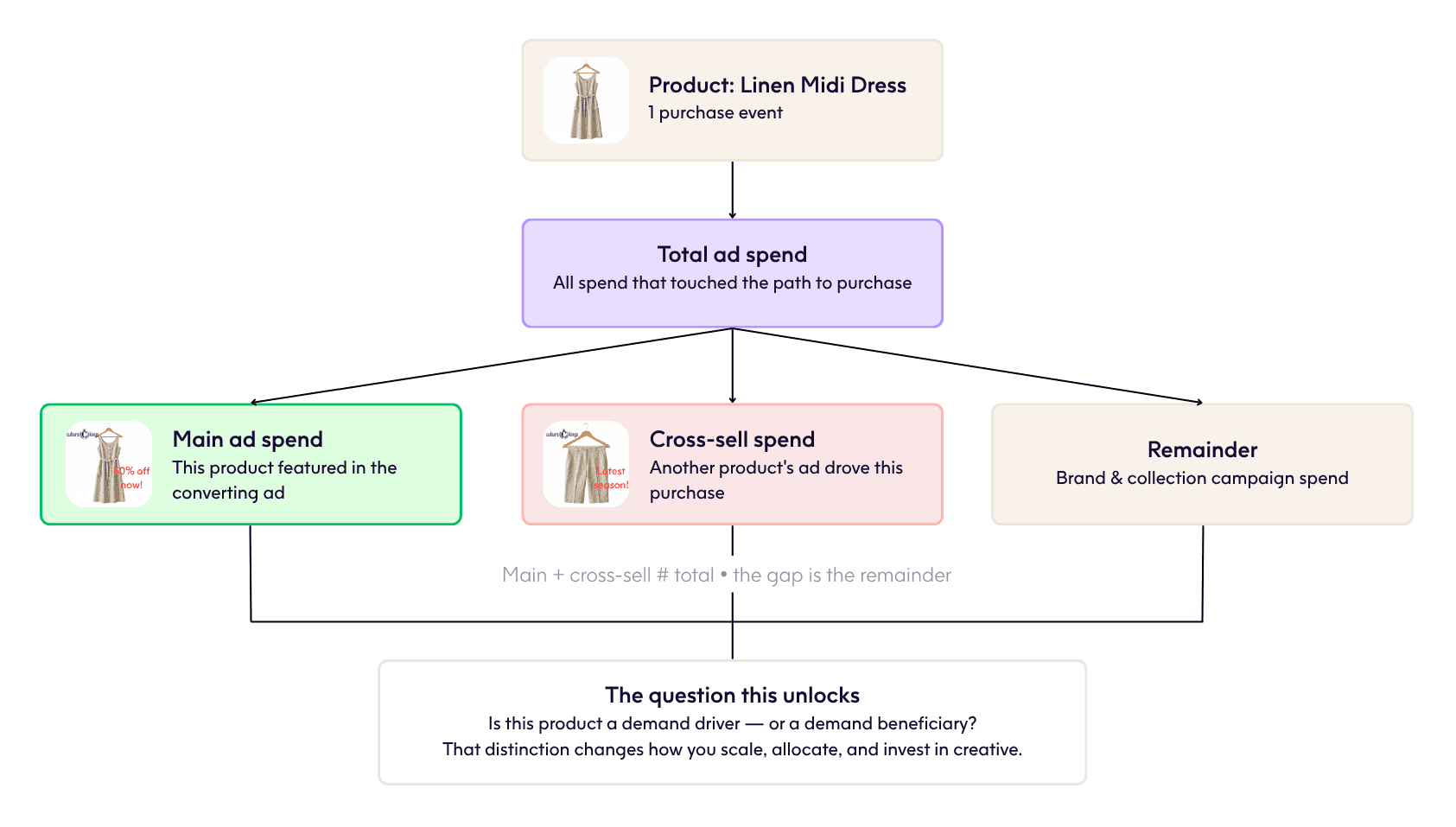
Allocated ad spend — the marketing cost attributable to driving that sale, broken down to product level where possible
Reconciling all of these manually — across Shopify, your 3PL, your ad platforms and your returns system — is where most brands give up and fall back on blended averages. ProfitPeak connects all of those sources automatically, so contribution margin by SKU is calculated in real time without a single spreadsheet.
Why Blended Averages Lie to You
The mistake most Shopify brands make is calculating margin at the store or category level and assuming it distributes evenly across SKUs. It doesn't.
A $120 product with high return rates, heavy packaging and consistent discounting can have a lower contribution margin than a $40 product that ships flat, never gets returned and sells at full price every time. Blended reporting hides this completely.
The Sugar High report — James Hurman (Tracksuit) and Klaviyo's analysis of 176 Australian brands tracked by ProfitPeak — found that 70% of all discount events generated negative contribution profit. That number is only visible when you look at margin by SKU, not by store average. It's the kind of finding that only surfaces when every variable cost is attributed at the product level — exactly what ProfitPeak was built to do.
Also read Klaviyo's "Sugar High - The Sour Truth of Discounting" report
How to Do This in Practice
Manually calculating true contribution margin by SKU in Shopify requires pulling data from multiple sources and reconciling them in a spreadsheet. For brands with more than a few hundred SKUs, that's a full-time job done badly.
ProfitPeak eliminates that process entirely. COGS, ad spend, fulfilment costs, discounts and returns are pulled into a single product-level view automatically. Contribution margin by SKU is live on your dashboard — updated in real time as orders come in, discounts are applied and returns are processed. You can sort by highest and lowest margin, filter by product class, and see immediately which SKUs are earning their keep and which are quietly costing you.
For brands preparing for a promotional period, that view is particularly valuable. You can see, before the sale goes live, which products can absorb a discount and still contribute positively — and which ones can't.
The Number Worth Knowing
Revenue tells you what sold. Contribution margin by SKU tells you what's worth selling — and at what price, in what volume, with what marketing spend behind it.
If you can't see that number today, you're making your most important commercial decisions without the most important commercial data. ProfitPeak makes it the easiest number in your business to find.
ProfitPeak is used by leading Australian Shopify brands including Ksubi, Frankie4, Arms Of Eve and Pace Athletic to track true profitability at the SKU level — in real time, without spreadsheets.
ProfitPeak
Content
The profit intelligence guide for your retail journey.